Make your point with photo mats

Now that you have an idea of how to crop pictures, use templates and pocket pages, keep journal notes, and organize an album, you need just two more scrapbooking techniques and your basic toolkit is ready to scrap away!  Those techniques are matting and journaling. Today, I’m going to hook you up with some great videos that show different ways to mat photos. They all work well and you can try them all…then pick the one you like best.

Why mat your pictures?

The main reasons are

  • To make your picture the focus of the page and bring the viewer’s eye to the picture
  • To distinguish your picture from patterned background; and
  • To allow you to give depth to the overall page.

Let’s look at some examples. You’ve seen these before, but let’s look at how the matting affects how you look at the page.

IMG_2388

In this example, the blue border and orange title bring your eye directly to the picture while the “fishies” swim around the edge.


solar eclipseIn this example, the yellow border distinguishes the photos from the bright dotted background. Even the title benefits from matting here…imagine how lost the word “solar” would be  if it were floating on that bright dotted background!


img_9814photo-e1556481570766.jpgIn this example, the multiple mats bring the pictures out of the page. Note that three narrow pictures are matted on the same mats, suggesting a sequence from left to right. I mounted the matted pictures on an angle to help promote the idea of motion from one picture to the next.


IMG_2311(Edited)Similarly, the three pictures on this page were matted an overlapped. This gives your eye a line to follow (from top left to bottom right) AND the black mats keep the three pictures distinct from each other.


Should mats be solid paper, solid card stock, or patterned paper?

All three can be used for mats as long as they are acid-free and lignin free. However, when using patterned paper to mat pictures, be sure the pattern doesn’t overwhelm the picture.

joe-is-22.jpgFor example, on this birthday page, I used the same yellow dotted paper for the title bar and to mat the pictures. If these were not closeups of faces, I would not have used such strong patterned papers all around them. Imagine if those pictures were long shots of kids on a playground or a teen on stage in a play…the picture could easily be “outdone” by the surrounding papers and mat! The great news is you can try it before you cut mats and use adhesive. Just lay the picture on the proposed mat paper, step back and take a look to see if the picture is enhanced or diminished by the matting paper.

Can you mat things other than pictures?

Yes! Look above at the SOLAR page…see the matted strip of flags at the bottom of the page? The black mat makes the flags stand out away from the background paper. In the birthday page above, the gift in the top right corner is matted, again to distinguish it from the background.

In the example below, I matted the border vine, double matted three stickers, and matted the title. Similarly, on the “Fish and Chips” page above, I matted the title.  A fellow scrapper, Erin, taught me another trick. Sometimes you end up with a “hole” on your page. You don’t have another picture to add, your embellishments/borders don’t fit there…you just have a “hole” and the page looks unbalanced. Erin uses a layered mat (2-3 layers of solid and patterned paper) as a focal point, just as if there were a matted picture in that spot. Try it sometime! It works!

IMG_2309(Edited)

How do you mat a photo?

If you are using 4×6 photos and matting paper that is square or rectangular, matting a picture is very easy. Here are three short videos and a page showing three different techniques for cutting a mat for your photo. These demonstrate use of a paper cutter BUT remember you can do the same thing with a ruler, pencil, and sharp pair of scissors (see my previous blog entry for description of how AND for paper cutter examples).

Can you mat a picture cut in other shapes?

Yes, but it gets a little trickier. If you are using a jar, bottle, or bowl to draw a circle and cut your picture in a circle shape, you need to have another jar or bottle that is 1/8 to ½ in. larger diameter to draw the mat. Of course, it’s easier if you have a circle cutter or set of circle cutters and templates. You can get circles, ovals, diamonds and other shapes. Here are some examples:

Do you need to mat every picture?

No. You mat a picture for the three reasons above. Note that a mat will not protect your scrapbook from materials that are not acid-free. For example, you might have brochures, ticket stubs, theater programs, etc. that you want to include in your scrapbook. Just matting them does not provide full protection from any acid or lignin these may contain. The best solution is to use a protective envelope (such as Keepsake Envelopes) that will stick on your page (or to the mat you put behind it!). I do not use these regularly but I try to be careful to not put memorabilia on top of or touch pictures.

Hope that this gives you some ideas about matting your pictures!

Happy scrapping!

Marsha

Note: As always, I am sharing some products and links in this blog entry. I do not receive promotional consideration from any of the linked sources. I am a Creative Memories consultant but do not receive promotional consideration for including links in my articles…I am sharing products that I have found useful. If you are looking for a Creative Memories consultant, please feel free to access my page here.

Using Templates

One of the nice things about scrapbookers is that they LOVE to share their work. And, consequently, they share templates for other scrapbookers to make a similar page! For example, this weekend is Easter and, if you celebrate this holiday, you might take some pictures of kids or grandkids on an Easter egg hunt, digging through an Easter basket, or wearing Easter outfits. Now you want to put those prints into an album…how can you lay them out so they will be pretty and make you think “Easter!” when you look at the page?

One great source of ideas is Pinterest.com. If you search “Easter scrapbook layouts,” you will find a wealth of ideas! Take a look!

Some layouts are rather complicated and, if you are just getting started, you may think, “How do I DO that page? Where do I start?”


This is where using a project template can be really helpful. Project templates break a page down into simpler pieces, helping you to create progressively more intricate and complicated pages.  Let’s look at an example:scrapbook template samplehttps://www.pinterest.com/pin/305681893452099138/

This layout by Kelly Holifield (Thanks, Kelly!) uses four different printed papers (green, yellow, pink and purple dotted paper) and one plain paper (the light purple). It displays three pictures in vertical format, and a few Easter stickers (eggs and bird).

Let’s break it down. To do a similar page, you need:

  • 4 strips of paper, about 1 ¼ or 1 ½ inches wide, and 12 inches long. If you are not sure how to measure and cut strips of scrapbooking paper, see my earlier blog.
  • They can be a mix of patterned and plain paper…whatever YOU like! They don’t all have to be different but I would try to have at least two different patterns or colors. So you need at least 2-3 sheets of 12 x 12 pattered or plain paper
  • 1 strip of paper about 11 inches long and 2 inches wide (the pink dotted rectangle in the sample)
  • 1 strip of paper about 10 inches long and 3.5 to 4 inches wide (the yellow dotted rectangle in the sample)
  • 1 circle of paper about 7-8 inches across (don’t have a circle cutter? See below) Want to make it a little more “Easter-eggy”? Cut it as a fat oval to be more egg-shaped.
  • A couple of stickers (optional)
  • A sheet of background paper or your scrapbook page
  • Adhesive to attach the paper and pictures to the page
  • An acid-free pen to write a title and journal

How do you assemble a page like this?

  • Always lay it out FIRST before you attach anything!
  • Work from the back to the front in laying out the pieces. In this case
    • Layout the four long strips in the back
    • Add the circle
    • Add the large (yellow dot) rectangle
    • Add the pink rectangle
    • Add the photos

This layout has some really good features for the beginner:

  • The first long strip, the yellow rectangle, pink rectangle and circle are all right justified, that is they touch the right hand border. This makes lining them up much easier.
  • Note that the circle touches both the right side and the top…easy layout!
  • It does not require tools other than those for basic measuring and cutting. The biggest challenge is cutting a circle. Use a bowl, lid, or bottle as a guide to draw a circle. There also are circle cutters that you can use for pictures or paper. I  use the Creative Memories Circle Custom Cutting System Patterns but there are lots of circle cutters (see Amazon search!)

Now LOOK at your layout.

  • Do you like it?
  • Do you want a little more or less space between the four strips?
  • Is there room for the title?
  • Is there room for the journaling (if not…consider cutting that circle across the middle and pulling the two halves apart a bit…the yellow dot rectangle will cover it!)
  • Do you like the order of the your pictures left to right?
  • Do you like the pictures tilted?

Once you have it the way you want it, you can use a No. 2 pencil to make a small dot where you want the four strips to be, where you want the yellow and pink rectangles to be, etc. Mark lightly so you can use your white eraser to remove the mark when you are done.

Remove each piece and then start using the adhesive. Again, start at the back and add layers. When you are done with the adhesive, you can add your title, journaling and stickers. Presto! You just made a great layout using a template. AND you can the idea over and over! This would be a great layout for Halloween, a birthday, Christmas, Thanksgiving, or any other event. For Spring, think pastels. For fall, think browns, tans, and rusts. For Winter, think blues and grays or reds and greens. For Summer, intense colors like deep pinks, blues, greens, reds, oranges, etc.

Many times you will see templates offered as a black and white drawing. For example look at this sample template from the Creative Memories blog :storytime_layout3_sketch-2https://blog.creativememories.com/2019/04/14/weekly-sketch-round-up-april-8-12/#more-40615 

What do you see?

  •  This appears to be a square layout, probably 12 x 12
  • Two 4 x 6 photos
  •  Two large squares of paper serving as background.
  • Some little paper strips for highlight.

But what are all those flowers, circles and asterisks? Am I supposed to cut out all of those?

No! You will often see clusters of flower shaped figures on a template. You may see stars or circles. These “clusters” tell you where the creator of the layout thought embellishments like stickers or sayings should be placed. WHAT those embellishments are is up to YOU! So, for Halloween, you might have pumpkins, apples, ghosts, etc. For a snowball fight, snowflakes. You get the idea. Don’t be thrown by the “flower cluster!”

Last week, Creative Memories hosted the first Worldwide Virtual Crop and sent out 12 different challenges (templates). People came up with HUNDREDS of ways to use them. Here is my take on Challenge #4. Note that I followed the general idea: 2 vertical pics, three circles across the middle, title and bottom border, and an embellishment on the top right corner. But I added another wide pic and moved the title up and didn’t have any embellishment on the upper left corner.

Important: Think about the number of pictures you want on a page and their orientation.

Trying to use a template where your pictures are VASTLY different from the orientation and size on the template makes it hard (but not impossible) to use the template. Remember that the point is sharing your pictures…not replicating a template!

Now it’s YOUR turn:

Challenge #12 is straightforward, uses three pictures, and 3-4 colors of paper. The embellishments are up to you! See the link below and scroll down for a couple of ideas (remembering that these were done by CM consultants so they put quite a bit into them!).

Challenge on!

https://blog.creativememories.com/2019/04/13/worldwide-virtual-crop-2019-challenge-12/

Comment and share your finished products!

Happy Scrapping!

Marsha


Organizing Your Album

It doesn’t seem like it would be a big issue. You make an album. You add some pictures. You journal, add some embellishments (stickers, borders, mats for the pictures). Done!

The BIG Debate

There is, however, an ongoing discussion among scrapbookers:

“How do you organize your albums?”

Last week, there was another discussion on the Creative Memories Advisers discussion board on the same topic. Yep, the folks who do this for a living don’t all agree! Why is this hard? You add them in chronological order and – Voila! – you are done! Well…not quite. There are some reasons that doing only an annual album can cause some problems.

Major events don’t always fit in an annual scrapbook

You wouldn’t just tuck a few pictures of your formal wedding into your 2018 scrapbook, right? Similarly, if you went on your dream vacation to Paris (or whichever place fills YOUR dreams), those pictures would probably overwhelm the three pictures of the Mother’s Day breakfast your kids cooked and the selfies you took when you went to a concert with friends. Many scrapbookers do separate albums for major events when there are a LOT of pictures they want to include in their scrapbooks on a single event. Examples include weddings, graduation, 25th or 50th wedding anniversaries, baby books, retirement events, and major vacations…essentially any event that can fill or nearly fill a scrapbook.

Major event albums don’t cover the “times of your life”

If you only do scrapbooks of major events, you end up with a lot of important pictures that don’t fit. What do you do with that last wonderful picture of you and your grandmother on the day you stopped by to bring her some groceries? You don’t have enough pictures to do a whole album unless you are doing a whole album on Grandma.  And what about those two great shots of the kids covered in cookie dough and flour? Or that precious picture of the dog looking guilty after he ate the tomatoes off the counter?  And that cute selfie of you and your sweetheart at dinner. Those have GOT to be in your book. You can post them on Facebook or Instagram but that is not preserving them, as we have discussed before.

Here is my solution…but it’s not the only one!

I do an annual album (Jan-Dec) and make separate albums for major events such as big vacations, graduations, and weddings. Do I keep EVERY item in chronological order? Mostly, but not compulsively. I have tried to relax about having everything in exact chronological order, but I DO put the month and date on each page or group of pages. What about those major events like weddings or graduation? I usually put a key picture or two into my annual album so I capture when the event happened in our family history. I have friends who do things differently, with a birthday album for each child with a couple of pages devoted to each birthday. Some do albums about their parents and others do an album for each child. Some do ONE album and make digital prints for each child. Consider what you want to preserve, how much detail you want to keep, and who will be the lucky recipient of those albums when you are gone. Then pick a strategy and get scrappin’!

A Great Opening

When you open a published book, there is always important info up front about the author, publisher, place of publication. In recent years, I have started filling in the signature block on the inside cover of my albums. After all, it’s my work!

Next, I include an album cover page so the reader knows something about the album. I have not done so, but it would be nice to have a standard piece of text on your cover page, e.g., “This album is part of the Smith-Wilson family history, Laurel, MD.” I always include the date. The cover page design (see slideshow below) is always tough for me. I do it last, as I’m finishing the album.  Sometimes I try to sum up the entire year…other times, I just give it a label. I did ONE collage in 1999…took a LOT of time and a LOT of pictures to make it look right. In 2008, I did a page of pics and headlines to highlight the year (see below). In 2015, I was inspired by the stickers and papers in a packet.


This slideshow requires JavaScript.


Wrapping it up.

In my albums, the closing page usually follows Christmas photos. In recent years I have added our annual Christmas letter that goes into our Christmas cards as a closing page of the album. It usually sums up the highlights nicely!

IMG_0129

It takes a village…

I also have started adding notes or pictures on where I was when I made the scrapbook. If I was at a retreat, I take pics of my fellow scrappers. They all offer advice and inspiration so it’s only fair to acknowledge their help! And it’s fun later to remember when and when I scrapped the book!


Don’t get bogged down in the details!

Having said all of this, don’t let planning and organizing get in the way of DOING your album. Pages can be added and rearranged. Cover pages can be an afterthought. Just make that initial decision about what kind of album THIS will be and get scrappin’!

Do YOU do an annual album? What do you include? Please share your tricks or examples!

Happy Scrappin’!

Marsha

The Paper Trail – Where Does it Lead?

One of the tough parts about any hobby is figuring out what to do with your equipment and supplies. In this blog, I’ve been discussing how to scrap without buying a lot of supplies at once. But the supplies you HAVE to have, and in some quantities, are

  • Photos
  • Scrapbook pages
  • Scrapbook paper

Today, I’ll share some of my simple solutions for storing these items safely so you can easily access them for scrapbooking. Please note that I do not work for or receive any compensation from any of these companies. I’m simply sharing what I’ve found that works for me.

Photos

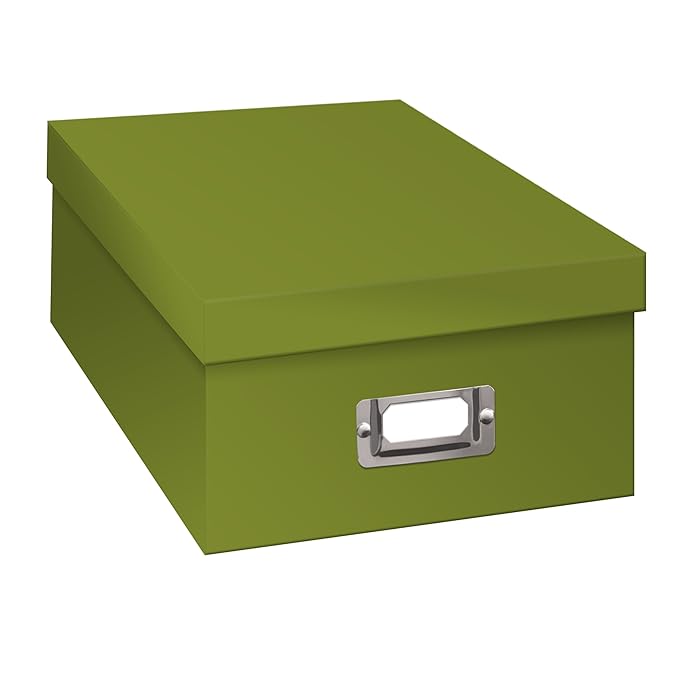
My absolute “go to” for photo storage are cardboard photo boxes. You can get them Pioneer Photo Storage Boxes, Holds Over 1,100 Photos Up To 4-6 Inches Photo Album-Sage GreenANYWHERE: Michaels, Amazon, Target, Jo-Ann Fabrics, Container Store, Walmart, etc. Be sure they say “acid free.” You can get them in an array of colors and patterns so have fun with that! And the great part is you can use them for lots of things: photos, memorabilia, embellishments (stickers, etc.), supplies, etc. They stack nicely, have a labeling slot so you can re-label them easily. You can use them over and over each year or project. Or you can store pictures in them for long term storage. My only warning is to NEVER, EVER pay full price for these. They go on sale regularly. I usually get them at Michaels for $2 on sale; they are regularly $6-8 each. 

There are other photo organizing options such as plastic bins, but I am happy with my cardboard boxes. They are acid-free and protect my photos from light. I fill them with heavy pictures and have never had one break, crack, or buckle. And I figure the world has enough plastic already so I’ll use cardboard where I can.

Scrapbooking Paper and Pages

This is where storage options get a little tougher. If you make 12 x 12 albums, both items are “oversized” for nearly all office storage boxes (which are made for letter size or legal size), so you need a storage box or bin designed for scrapbooking. Fortunately, there are some reasonable options.

The shipping box: If you order materials from Creative Memories, Scrapbooking.com, Amazon, Echo Park or some other vendor and are lucky enough to receive a box that perfectly holds 12 x 12-inch items, keep it! It can serve you as an organizer or storage box for your materials when you are starting out. I would worry about long term storage. Nothing says the cardboard is acid-free so think of these as temporary housing.

IMG_2466

Clear plastic cases: OK, I said the world has enough plastic but these are NOT throwaways. In fact, I’ve never had one break in 20+ years of scrapbooking and I use the same ones over and over. These hold scrapbook pages, paper, embellishments, etc. without bending. Note that for some scrapbook pages you may need to turn them 90 degrees…the inside is not completely square.

I also use them to store memorabilia, journaling notes, etc. for each year until I have the album done.

Like photo boxes, I always buy them on sale, usually for $4 or less at Michaels.

classroom-construction-paper-storage\


Shelves for paper: These are very handy, but they are not my favorite. Unless you build a cover for them, they are open to dust and light. But they are very easy to use, come in an array of styles and prices, and you can usually stack them to increase your storage options.

Next steps?

When you collect more items than are easily handled by a couple of boxes and bins, here are some easy expansions…and some down-the-road dream products.

iris 6 drawer cartAn Iris 6-case scrapbook cart: One of my first storage purchases! I had a box for scrapbook pages, one each for patterned and plain papers, one for stickers/embellishments, one for 8.5 x 11 paper, and one for the project I was working on. And it was on wheels! I have rolled it all over the house and into many scrapbook weekend events. It is moderately sturdy but needs a little TLC since I fill those boxes with heavy paper. Standard price is about  $34 but you can often find them on sale at Target, Michaels, Walmart, etc.

The downside? Because the drawers are clear, the cart doesn’t protect paper from light damage. But I came up with a fix for that. I folded an inexpensive light-blocking curtain panel lengthwise and stitched along the fold (not a sewing person? Hot glue gun or Stitch Witchery would work fine). Then I used some Velcro strips to make my “wrap skirt” stick to the rim. Voila! A light protective wrap that easily opens when I want to use the drawers! Cost: About $10.

A lateral filing cabinet: I called a used office furniture shop to see if they had a used two-drawer lateral filing cabinet. If I bought it new? $400+ but used was $100. And it holds ALL my scrapbooking supplies and equipment. Hooray! Even better, it gave me more surface area to spread out when I’m scrapping! If you get one, be sure to measure the inside drawers to make sure they are 14 inches deep.

Down-the-Road Dream Products

Bookcase with adjustable shelves: Again, try a used office furniture store. New $129 but you may score one for half of that if buying used. Great for storing your albums, photo boxes, etc.

IMG_2319

ScrapRack: This was my Christmas wish a few years back that Santa Hubby made come true! It is a flip rack for your paper, embellishments, etc. I love, love, love it. But it DOES take space. I put it on top of my filing cabinet. And how do I protect that paper from light? I use the other light-blocking curtain panel left over from my cart wrap to drape over my paper when I’m not using it. You can find ScrapRacks at Totally Tiffany.

IMG_2317

I must also comment that the Totally Tiffany folks are wonderful at customer service. I lost a connector piece at one point. I called to ask how to order it and they sent me one for free. Years later one of the Spinders (notebook style binder clamps that hold the paper) pulled away from its Velcro backing. The company instantly replaced it.

And if you want to really get crazy, check out the WorkBox 3.0… It doesn’t suit my scrapbooking style but it’s a great idea!

work box


How do you store your paper? Please share!

Happy organizing!

Marsha